telemetry
Quoi de neuf

Contrôler sa VMC StorkAir / ComfoAir / zehnder via sa domotique

  • Forum Electricité - Domotique
  • Auteur du sujet Auteur du sujet sebcbien
  • Date de début Date de début
  • #821
Noted, I think we did something else, can't recall what, but I'll check

I think I've found something: http://www.raspberrypi-spy.co.uk/2015/10/how-to-autorun-a-python-script-on-boot-using-systemd/
and they say:
The permission on the unit file needs to be set to 644 :

sudo chmod644 /lib/systemd/system/myscript.service
Is that it? I will check it in a couple of hours...

Correction, what I've done it's below - it registered the service and after reboot
sudo systemctl daemon-reload
sudo systemctl enable VMCserver.service
sudo reboot

server.py is up and running:
Nov 20 11:58:25 garaz server.py: Starting NEW VMC server on device/dev/ttyAMA0, Debug to:/var/log/VMClog.log, running on IP address:('', 10003)
Nov 20 11:58:25 garaz server.py: Starting VMC server for ConfoSense on IP address:('', 10001) port 10001
Nov 20 11:58:25 garaz server.py: Starting VMC server for Control on IP address:('', 10002) port 10002
Nov 20 11:58:25 garaz server.py: socat started on /tmp/ttyVMC, PID:728
 
Dernière édition par un modérateur:
  • #822
One small note. In Fhem, VMC settings I think I have to set:
/tmp/ttyVMC 300 - as per VMC.ini entry
what is followed by:
2015.11.20 12:17:44 3: Opening VMC device /tmp/ttyVMC
2015.11.20 12:17:44 3: VMC device opened

If I keep default
ttyVMC 300
I receive only:
2015.11.20 12:16:25 3: Opening VMC device ttyVMC
2015.11.20 12:16:25 3: Can't open ttyVMC: there's no file
 
  • #823
listhor;1056121 a dit:
One small note. In Fhem, VMC settings I think I have to set:
/tmp/ttyVMC 300 - as per VMC.ini entry
what is followed by:
2015.11.20 12:17:44 3: Opening VMC device /tmp/ttyVMC
2015.11.20 12:17:44 3: VMC device opened

If I keep default
ttyVMC 300
I receive only:
2015.11.20 12:16:25 3: Opening VMC device ttyVMC
2015.11.20 12:16:25 3: Can't open ttyVMC: there's no file

Yes the path needs to be setup in full in the FHEM definition, I check the install maybe I missed it, thanks for pointing it out.

Otherwise, have you got a working connection now ?
 
  • #824
Bonsoir,
j'ai testé à vide le RJ45 qui arrive de la VMC et qui se connecte sur la carte électronique. j'ai 21V sur la pin 1, rien sur la 2 et 3. je ne sais pas si c'est normal.
 
  • #825
SpigoloN;1056272 a dit:
Bonsoir,
j'ai testé à vide le RJ45 qui arrive de la VMC et qui se connecte sur la carte électronique. j'ai 21V sur la pin 1, rien sur la 2 et 3. je ne sais pas si c'est normal.

Heu, si le comfosense fonctionne, le signal est bon sur le rj45.

Au cas où, voici le logiciel du fabricant pour connecter la VMC via un PC (windows)
 
Dernière édition par un modérateur:
  • #826
jcoenen;1056232 a dit:
Yes the path needs to be setup in full in the FHEM definition, I check the install maybe I missed it, thanks for pointing it out.

Otherwise, have you got a working connection now ?

Now I think I do have working serial ports. I can't test them as, like I said, I'm out of home (couple thousands of km off) and I'll be back in a few weeks. For sure I will let you know once everything is smoothly running - I will also start that brief tutorial.
In the meantime I want to "polish" :-D plots translation (axis) and try to change Fhem style (default one is ugly as f...k, haha).
BTW, it looks that Fhem styles aren't installed along with Fhem itself - when I try to swap styles, nothing happens. Is there a way to install them?
Do you advice to keep updating Fhem from Fhem website or just stick to version installed via apt-get?

OR

The best would be to add Fhem repository:
Import repository gpg key:
wget -qO - https://debian.fhem.de/archive.key | apt-key add -

Add repository to /etc/apt/sources.list:
deb https://debian.fhem.de/stable ./

Update your package administration:
apt-get update

Install fhem:
apt-get install fhem
 
Dernière édition par un modérateur:
  • #827
listhor;1056296 a dit:
Now I think I do have working serial ports. I can't test them as, like I said, I'm out of home (couple thousands of km off) and I'll be back in a few weeks. For sure I will let you know once everything is smoothly running - I will also start that brief tutorial.
In the meantime I want to "polish" :-D plots translation (axis) and try to change Fhem style (default one is ugly as f...k, haha).
BTW, it looks that Fhem styles aren't installed along with Fhem itself - when I try to swap styles, nothing happens. Is there a way to install them?
Do you advice to keep updating Fhem from Fhem website or just stick to version installed via apt-get?

Sorry I though you were gonna be home for the week-end :-D

FHEM updates, easiest is to issue the "update" command in the web page command line, the rest is automatic, sometimes it requires restart, command "shutdown restart".

I haven't touched the styles, I presume they should be within the installation, they basically change the CSS, the pages keeping same layout.

This side I use tabletUI which give a more "polished" finish, you'd like that ;-)

TabletUI is geared for iPad like devices, but needs to be configured manually, not that difficult though but can be tedious.

https://github.com/knowthelist/fhem-tablet-ui

Some demos https://github.com/ovibox/fhem-ftui-user-demos

Some are OK some aren't to my taste, but heck beauty is in the eye of the beholder.
 
Dernière édition par un modérateur:
  • #828
Thanks for "update" command tip! It was really painless and it looks that all missing styles also have been downloaded and from now on, I can change Fhem styles.
It's time for polishing!

And thanks for all, in the middle of December I will present my progress :-D
 
  • #829
jcoenen;1056283 a dit:
Heu, si le comfosense fonctionne, le signal est bon sur le rj45.

Au cas où, voici le logiciel du fabricant pour connecter la VMC via un PC (windows)

Bonsoir,

je ne possède pas le comfosence, un soft PC c'est justement ce que je cherchais hélas j'arrive pas à le lancer ni sous 7 ni sous XP.
 
  • #830
SpigoloN;1056514 a dit:
Bonsoir,

je ne possède pas le comfosence, un soft PC c'est justement ce que je cherchais hélas j'arrive pas à le lancer ni sous 7 ni sous XP.

Je viens de télécharger depuis le lien (sourceforge) avec firefox et Windows 7, le programme part sans problèmes (j'ai aussi une version sur un XP qui est opérationnelle).

Que signifie donc "je n'arrive pas a le lancer" ?

Il ne démarre pas (pas de fenêtre qui s'ouvre)?
Il démarre mais ne permet pas la configuration (com port demandé au départ, le com port correspond au port série du PC connecté a la VMC, et est indispensable) ?
Il démarre et sélectionne le com port mais pas réponse de la VMC connectée au dit port ?
...
 
  • #831
Le programme a cessé de fonctionner: Nom de l'événement: CLR20r3 (j'magine que ça ne veux rien dire)
j'ai essayer aussi le .zip de sourceforge.
problème avec ma version française de windows?
 
  • #832
SpigoloN;1056577 a dit:
Le programme a cessé de fonctionner: Nom de l'événement: CLR20r3 (j'magine que ça ne veux rien dire)
j'ai essayer aussi le .zip de sourceforge.
problème avec ma version française de windows?

Le problème c'est Windows ... apparemment c'est un problème connu, dont voici les possibles résolutions que la force soit avec toi !

Au cas où je ne suis pas un spécialiste windows, c'est trop aléatoire à mon goût, je préfère Unix (linux, solaris, HPUX, OSX ...) au moins on y peut mettre les mains.
 
  • #833
Hi All,

I've been going through Fhem website looking for how to reposition menus/items within one room view. Particularly, I want to move VMCSpeed menu somewhere else. At the moment it looks like the view is sorted by alphabetical order.
One more, I've created weather forecast widget/device and I can't assign it anywhere. Atrr - room - VMC (or all) can't be saved.
What I'm doing wrong?

------------
I'd forgotten to ask about WeekdayTimer. By default is in German and I would like to change it to English and I typed in command window, as per instruction on Fhem website: set WeekdayTimer en
and nothing has happened. Or just it's better completely delete existing one and create new: define <name> WeekdayTimer <device> [<language>] [weekdays] <profile> <command>|<condition>
 
Dernière édition par un modérateur:
  • #834
listhor;1056810 a dit:
Hi All,

I've been going through Fhem website looking for how to reposition menus/items within one room view. Particularly, I want to move VMCSpeed menu somewhere else. At the moment it looks like the view is sorted by alphabetical order.
One more, I've created weather forecast widget/device and I can't assign it anywhere. Atrr - room - VMC (or all) can't be saved.
What I'm doing wrong?

------------
I'd forgotten to ask about WeekdayTimer. By default is in German and I would like to change it to English and I typed in command window, as per instruction on Fhem website: set WeekdayTimer en
and nothing has happened. Or just it's better completely delete existing one and create new: define <name> WeekdayTimer <device> [<language>] [weekdays] <profile> <command>|<condition>

Views are indeed "sorted", I have not been able to modify the display order so far.

Weekdaytimer (or any other device), you cannot modify the parameters of a device once it is created, these are set at definition time so delete it and recreate it or change it in the config file and issue the rereadcfg command.

Forecast widget, I don't know, never used it, room attribute, you need to select the room in the poup window and then click on attr button to validate it (room will eventually create it), config need to be saved as well to save it.

Cheers
 
Dernière édition par un modérateur:
  • #835
Views are indeed "sorted", I have not been able to modify the display order so far.

Weekdaytimer (or any other device), you cannot modify the parameters of a device once it is created, these are set at definition time so delete it and recreate it or change it in the config file and issue the rereadcfg command.

Forecast widget, I don't know, never used it, room attribute, you need to select the room in the poup window and then click on attr button to validate it (room will eventually create it), config need to be saved as well to save it.

Thanks for above. So far I've been using "Enter" button to confirm changes but on some attributes it wasn't possible.
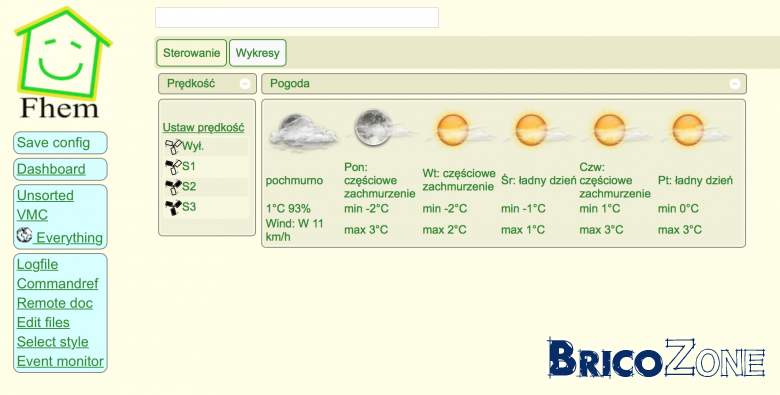
In regard to Fhem page layout, I think quite useful is to create dashboard "device" (define <name> Dashboard) where you can drag and drop existing devices to change layout:


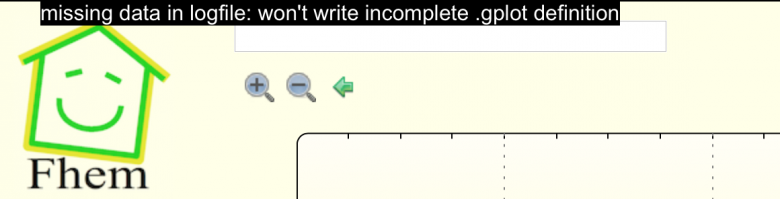
But in the meantime, I've encountered another problem. It seems that after recent update plot files got damaged. When I try to edit and save changes I receive:
missing data in logfile: won't write incomplete .gplot definition
590965653a6343fa3e.png

There's not too much info about that issue available in the internet. I've found a few discussions in German and they say something about creating a new SVG plot. I would like to avoid it as I'm not sure I will create and linked new one correctly. Any suggestions of how to repair plots? Thanks in advance...
 
  • #836
jcoenen;1056762 a dit:
Le problème c'est Windows ... apparemment c'est un problème connu, dont voici les possibles résolutions que la force soit avec toi !

Au cas où je ne suis pas un spécialiste windows, c'est trop aléatoire à mon goût, je préfère Unix (linux, solaris, HPUX, OSX ...) au moins on y peut mettre les mains.
merci,
j'ai commencer la réparation mais pas eu le temps de finir.
Par contre ce matin VMC arrêté... au tableau électrique ça avait disjoncté. J'ai remis en marche, ça a disjoncté de nouveau. j'ai branché sur un prise classique 10A ça tourne. consommation de la maison 650W je pense environ 400 à 500 venant de la VMC. Les ventilateurs sont à 35%, il fait -5°C à l'ext. la machine affiche -3.5 entrant, 3.5 sortant. je devais partir au travail donc je n'ai rien vu de plus. juste qu'il n'y avait pas d'erreur dans les menu 70,71,72.
 
  • #837
Au cas ou il y a t'il un dégivreur dans la WHR 930 ? j'étais persuadé que non mais je lis quelques part que oui.
 
  • #838
SpigoloN;1057110 a dit:
Au cas ou il y a t'il un dégivreur dans la WHR 930 ? j'étais persuadé que non mais je lis quelques part que oui.

A mon avis c'est optionnel, sur la mienne il n'y en a pas, l'installateur a placé une géothermie de son cru.
 
  • #839
Hi,

I used dashboard, but did not know about the drag and drop, cheers for that.

SVG plots, looks like the update changed the definition of the SVG file. Create a new one is not that complicated, you need to display the device's log file in the main window and create a new plot (there's a Create SVG plot link)

The you can choose what to plot from the log file (works by column).

You can also mix data from different files (need to define the log file and internal data column).

The alternative being to know what are the requirement of the new package and to bang them in with the editor ...
 
  • #840
jcoenen;1057117 a dit:
A mon avis c'est optionnel, sur la mienne il n'y en a pas, l'installateur a placé une géothermie de son cru.
Il semblerait que ça soit en option sur les comfoair mais de série sur les WHR.
voir: http://www.jestorkair.nl/upload/doc/WHR%20930ENG.pdf
en tout cas ça pourrait expliquer que mon disjonction 2A claque et que j'ai observé une pointe à 1200W (total maison mais je crois qu'il n'y avait rien de spécial d’allumé)
 
Dernière édition par un modérateur:

Sujet semblables

Réponses
10
Affichages
979
Nudji
Réponses
·
Affichages
145
Maka
Réponses
4
Affichages
385
Tchotto
Réponses
6
Affichages
1K
ironglove

Notre sélection

Retour
Haut