telemetry
Quoi de neuf

Contrôler sa VMC StorkAir / ComfoAir / zehnder via sa domotique

  • Forum Electricité - Domotique
  • Auteur du sujet Auteur du sujet sebcbien
  • Date de début Date de début
  • #921
Merci, je vais essayer de trouver ça.
Sinon avec la valeur de ventilation en % et la vitesse de moteurs on peut remonter à la pression statique et donc au débit d'air ?
en effet j'imagine que plus la différence de pression amont/aval est grande moins le ventilateur tourne vite pour une puissance donnée. donc il doit y avoir une relation.
 
  • #922
@lex;1065732 a dit:
J'ai le même style de valeurs.
Je pense que c'est OK. Il y a toute une doc sur les rendements plus haut sur ce fil.

C'est une valeur assez normale, le max est dans les alentours de 90%

Attention que le rendement diminue au fur et à mesure de l'encrassage des filtres, ce qui est logique finalement.
 
  • #923
There are 3 ports used

the Server port where python clients connect (client.py, cgi's) and the FHEM socat process.
the CCEASE/COMFOSENSE port where the socat connects

the control port, communicate with the server to look at the traffic

client and COMFOSENSE port MUST be different as there are differences in the treatment of the messages. If they are the same, thanks to the Comfosense continuous frames it will get ugly.

The comfosense (and probably the CCEASE) send requests to the VMC continuously, which can cause problem if the raspberry is also used intensively for other purposes (basically request cannot be handled on time by the pi)


I would suggest you use the default ports configuration until I fix the port assignment code.


FHEM timeout, this is a known bug, fhem waits for an ack from the server that will never come (need to fix it sometime), but the data frame is received, look at the date stamp of the data in FHEM VMC device page

If you change a port in the config file you need to restart all processes involved (i.e. server and all socat)

When you start socat on CCEASE, it should not stop fhem.

Do one thing at the time.

1. Start server, which should also start fhem socat.

2. Check a client to validate VMC connectivity.

3. Check FHEM is collecting data (do a get from VMC device for example)

4. Start the socat for the CCEASE.

When CCEASE is connected, repeat step 2 and 3 above

The debug level 8 should not be left on, as it slows down the server.
 
Dernière édition par un modérateur:
  • #924
Unfortunately, changing server port to default has changed nothing...

VMC.ini
[VMC]
device = /dev/ttyAMA0

[ConfoSense]
tty = /dev/ttyUSB0
port = 10001

[control]
port = 10002

[server]
bind = ""
port = 10000

[client]
server = "127.0.0.1"

[socat]
pty = /tmp/ttyVMC

[debug]
log = /var/log/VMClog.log
level = 8

Client is still able to communicate:
pi@garaz ~/raspVMC-master $ sudo ./client3.py
connecting to 127.0.0.1 port 10000
requesting data 0

{
"config": {
"actif": {
"P10": "actif",
"P11": "actif",
"P12": "actif",
"P13": "actif",
"P14": "actif",
"P15": "actif",
"P16": "actif",
"P17": "actif",
"P18": "actif",
"P19": "actif",
"P90": "actif",
"P91": "actif",
"P92": "actif",
"P93": "actif",
"P94": "actif",
"P95": "actif",
"P96": "actif"
},
"bypass": "present",
"confofond": "absent",
"enthalpie": "non reglemente",
"prechauffage": "present",
"taille": "undef",
"type": "undef",
"ventilateurs": {
"admission": {
"absent": 15,
"actuel": 35,
"vitesse1": 35,
"vitesse2": 50,
"vitesse3": 70
},
"extraction": {
"absent": 15,
"actuel": 35,
"vitesse1": 35,
"vitesse2": 50,
"vitesse3": 70
},
"extractionetat": 1,
"vitesse": 2
}
},
"data": {
"bypass": {
"correction": 0,
"facteur": 0,
"mode": "hiver",
"periode": 0
},
"etatswitches": {
"L1": "OFF",
"L2": "OFF",
"SDB": "OFF",
"SDBluxe": "OFF",
"hotte": "OFF"
},
"temperature": {
"Tairneuf": 10.5,
"Tconfort": 24.0,
"Textrait": 11.5,
"Trepris": 20.0,
"Tsoufflage": 18.0,
"capteur": {
"TEnthalpie": "absent",
"Tairneuf": "present",
"Tappoint": 0.0,
"Tapppoint": "absent",
"Tenthaplie": 0.0,
"Textrait": "present",
"Thotte": 0.0,
"Trepris": "present",
"Tsoufflage": "present"
}
},
"usage": {
"absent": 1503,
"antigel": 0,
"bypass": 9576,
"filtres": 71,
"prechauffe": 12,
"vitesse1": 18179,
"vitesse2": 9963,
"vitesse3": 0
},
"valvesetat": {
"bypass": 0,
"courantmoteurbypass": 0,
"courantmoteurprechauf": 0,
"prechauff": 0
},
"ventilateurs": {
"extraitpourcent": 35,
"extraitrpm": 1161,
"soufflagepourcent": 35,
"soufflagerpm": 1197
}
},
"device": {
"firmware": "3.20",
"name": "WHR 950 "
}
}
closing socket

Strange thing is that port 10000 isn't listed by number, only as webmin (it runs on different port):
pi@garaz ~ $ netstat -l
Active Internet connections (only servers)
Proto Recv-Q Send-Q Local Address Foreign Address State
tcp 0 0 localhost:7999 *:* LISTEN
tcp 0 0 *:7072 *:* LISTEN
tcp 0 0 *:webmin *:* LISTEN
tcp 0 0 *:tproxy *:* LISTEN
tcp 0 0 *:10001 *:* LISTEN
tcp 0 0 pigaraz.dom.net:8082 *:* LISTEN
tcp 0 0 *:10002 *:* LISTEN
tcp 0 0 *:8083 *:* LISTEN
tcp 0 0 *:8084 *:* LISTEN
tcp 0 0 *:8085 *:* LISTEN
tcp 0 0 *:ssh *:* LISTEN
tcp 0 0 *:56311 *:* LISTEN
tcp 0 0 *:8765 *:* LISTEN
tcp6 0 0 [::]:52801 [::]:* LISTEN
tcp6 0 0 [::]:http [::]:* LISTEN
tcp6 0 0 [::]:ssh [::]:* LISTEN
udp 0 0 *:mdns *:*
udp 0 0 *:36832 *:*
udp 0 0 *:bootpc *:*
udp 0 0 pigaraz.dom.net:ntp *:*
udp 0 0 localhost:ntp *:*
udp 0 0 *:ntp *:*
udp6 0 0 [::]:mdns [::]:*
udp6 0 0 [::]:37677 [::]:*
udp6 0 0 [::]:dhcpv6-client [::]:*
udp6 0 0 fd8a:1cd7:3d39:0:bd:ntp [::]:*
udp6 0 0 garaz.dom.net:ntp [::]:*
udp6 0 0 fe80::68d:38ff:fe9e:ntp [::]:*
udp6 0 0 localhost:ntp [::]:*
udp6 0 0 fd8a:1cd7:3d39:0:68:ntp [::]:*
udp6 0 0 [::]:ntp [::]:*
raw6 0 0 [::]:ipv6-icmp [::]:*


After executing:
socat /dev/ttyUSB0,raw,echo=0,b9600 tcp4-connect:172.16.0.15:10001

VMCserver log:
21/12/15 10:10:35 : expecting a reply
21/12/15 10:10:35 : received from VMC 07f307f000401500001244000604a83ddedb0000000000a55a5aa500fe070f
21/12/15 10:10:35 : 29 frames received from VMC only one is expected from theread
21/12/15 10:10:35 : frame received from VMC stored in client queue 07f000401500001244000604a83ddedb0000000000a55a5aa500fe070f
21/12/15 10:10:35 : sending 07f000401500001244000604a83ddedb0000000000a55a5aa500fe070f to ('172.16.0.15', 59352)
21/12/15 10:10:35 : ConfoSense Request for 07f0003300e0070f from ('172.16.0.15', 59352)
21/12/15 10:10:35 : Processing msg from queue ('172.16.0.15', 59352)
21/12/15 10:10:35 : Sending frame 07f0003300e0070f to VMC from Client ('172.16.0.15', 59352)
21/12/15 10:10:35 : Command code: 33 reply is True
21/12/15 10:10:35 : expecting a reply
21/12/15 10:10:35 : received from VMC 07f307f0003e04a83ddedb8d070f
21/12/15 10:10:35 : 12 frames received from VMC only one is expected from theread
21/12/15 10:10:35 : frame received from VMC stored in client queue 07f0003e04a83ddedb8d070f
21/12/15 10:10:35 : sending 07f0003e04a83ddedb8d070f to ('172.16.0.15', 59352)
21/12/15 10:10:35 : ConfoSense Request for 07f0003300e0070f from ('172.16.0.15', 59352)
21/12/15 10:10:35 : Processing msg from queue ('172.16.0.15', 59352)
21/12/15 10:10:35 : Sending frame 07f0003300e0070f to VMC from Client ('172.16.0.15', 59352)
21/12/15 10:10:35 : Command code: 33 reply is True

Fhem logfile gets timeouts from time to time and doesn't update VMC status instantly (i.e. changing speed from CCEase or through CGI):
2015.12.21 10:07:13 3: VMC: Request found in getHash created from parseInfo data
2015.12.21 10:10:13 3: VMC: timeout waiting for reply expecting 00d2 Request was 07f000d1007e070f
2015.12.21 10:10:16 3: VMC: timeout waiting for reply expecting 00e0 Request was 07f000df008c070f
2015.12.21 10:15:13 3: VMC: timeout waiting for reply expecting 00d2 Request was 07f000d1007e070f
2015.12.21 10:15:16 3: VMC: timeout waiting for reply expecting 00e0 Request was 07f000df008c070f

And CGI based VMC page also doesn't want to load - script keeps waiting for data to receive...

So, I think for a time being the best is to wait for the next release :-) and redirect my efforts to get Fibaro virtual device fully configured...
 
Dernière édition par un modérateur:
  • #925
One more,
Merry Christmas and Happy New Year! Thanks for all!
 
  • #926
Well, this system works only by polling, so if you change the speed on the CCEASE, only the CCEASE will get the reply from the VMC.

FHEM will know that the speed has changed when it will ask the speed to the VMC, so there will be some delays in that case, you can force fhem to do a polling request using the VMC page "get stufe".


Port 10000 is defined in Unix as webmin, that's why netstat translates it to webmin, even though webmin is not running.

It is very bizarre that the cgi script hangs, as it is the same as the client, which are doing fine apparently. You should have the same behavior from the cgi and the clients.

If I have the time, I will setup a raspberry for CCEASE and VMC (at the moment I have the VMC on one raspberry and the Comfosense on another).


Season's greeting to you too !
 
  • #927
In regard to CGI scripts and client3; I think maybe timeouts are different?
I mean, with CCEase socat command executed, client3 needs more time to present results (just has run it, to be sure):
pi@garaz ~ $ sudo /home/pi/raspVMC-master/./client3.py
connecting to 127.0.0.1 port 10000
requesting data 0

{
"config": {
"actif": {
"P10": "actif",
"P11": "actif",
"P12": "actif",
"P13": "actif",
"P14": "actif",
"P15": "actif",
"P16": "actif",
"P17": "actif",
"P18": "actif",
"P19": "actif",
"P90": "actif",
"P91": "actif",
"P92": "actif",
"P93": "actif",
"P94": "actif",
"P95": "actif",
"P96": "actif"
},
"bypass": "present",
"confofond": "absent",
"enthalpie": "non reglemente",
"prechauffage": "present",
"taille": "undef",
"type": "undef",
"ventilateurs": {
"admission": {
"absent": 15,
"actuel": 35,
"vitesse1": 35,
"vitesse2": 50,
"vitesse3": 70
},
"extraction": {
"absent": 15,
"actuel": 35,
"vitesse1": 35,
"vitesse2": 50,
"vitesse3": 70
},
"extractionetat": 1,
"vitesse": 2
}
},
"data": {
"bypass": {
"correction": 0,
"facteur": 0,
"mode": "hiver",
"periode": 0
},
"etatswitches": {
"L1": "OFF",
"L2": "OFF",
"SDB": "OFF",
"SDBluxe": "OFF",
"hotte": "OFF"
},
"temperature": {
"Tairneuf": 12.5,
"Tconfort": 24.0,
"Textrait": 13.5,
"Trepris": 20.5,
"Tsoufflage": 18.5,
"capteur": {
"TEnthalpie": "absent",
"Tairneuf": "present",
"Tappoint": 0.0,
"Tapppoint": "absent",
"Tenthaplie": 0.0,
"Textrait": "present",
"Thotte": 0.0,
"Trepris": "present",
"Tsoufflage": "present"
}
},
"usage": {
"absent": 1503,
"antigel": 0,
"bypass": 9576,
"filtres": 109,
"prechauffe": 12,
"vitesse1": 18215,
"vitesse2": 9963,
"vitesse3": 0
},
"valvesetat": {
"bypass": 0,
"courantmoteurbypass": 0,
"courantmoteurprechauf": 0,
"prechauff": 0
},
"ventilateurs": {
"extraitpourcent": 35,
"extraitrpm": 1146,
"soufflagepourcent": 35,
"soufflagerpm": 1198
}
},
"device": {
"firmware": "3.20",
"name": "WHR 950 "
}
}
closing socket

As contrary to "regular" status, when results are given almost instantly.
So, maybe CGI keeps timing out?
 
  • #928
What you could do, is to run the cgi from the command line and see what happen there.

just do

/usr/lib/cgi-bin/VMCbinjson.cgi

if it returns, then the problem is elsewhere

But in essence you're right, the CCEASE continuously sample the VMC and the other clients must fit in the blanks, which delays their sampling process.
 
  • #929
Jcoenen,

Do you think it is possible to interface with the server through the TCP port (10000)?
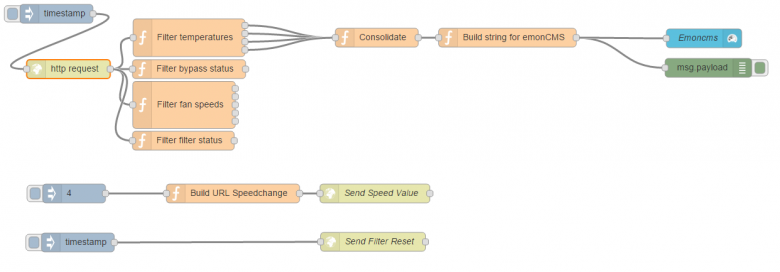
I'm currently experimenting a bit with node-red.
I've created a TCP connection to the server to send and receive, but I do not know the commands to send .

Also I think it could be possible to interface via serial to /tmp/ttyvmc?
But then I need to set up baud rate etc...

Ps: your server has been running all this time with no problems at all!! Kudos :)
 
  • #930
Bonjour à tous, j'ai pas suivi depuis un petit moment mais la dernière fois j'avais vu qu'on ne pouvait pas avoir une connexion entre la VMC et le raspberry ainsi qu'une connexion entre la VMC et le CCease.
Je possède une Zehnder Comfoair 350 Luxe sur laquelle il y a une prise RS232-PC, une prise RJ45 que j'ai raccordé au Raspberry, et un bornier RS232 KFB que j'ai raccordé au CCease. Mais quand je raccorde les 2 et que j'alimente le raspberry, il y a marqué sur le CCease NC. Est ce que c'est toujours le cas? Je crois que vous avez développé le programme pour que le raspberry renvoi les infos au CCease. Est ce que je me trompe?
 
  • #931
nodarii;1069333 a dit:
Bonjour à tous, j'ai pas suivi depuis un petit moment mais la dernière fois j'avais vu qu'on ne pouvait pas avoir une connexion entre la VMC et le raspberry ainsi qu'une connexion entre la VMC et le CCease.
Je possède une Zehnder Comfoair 350 Luxe sur laquelle il y a une prise RS232-PC, une prise RJ45 que j'ai raccordé au Raspberry, et un bornier RS232 KFB que j'ai raccordé au CCease. Mais quand je raccorde les 2 et que j'alimente le raspberry, il y a marqué sur le CCease NC. Est ce que c'est toujours le cas? Je crois que vous avez développé le programme pour que le raspberry renvoi les infos au CCease. Est ce que je me trompe?

Non c'est bien exact, en RS232 (connexion série asynchrone), il ne peut y avoir que 2 appareils.

Le serveur sert donc d'aiguillage pour permettre a X appareils de parler à la VMC via une connexion série, les appareils/clients se connectent au serveur via le réseau.

Dans le cas du CCEASE/CONFOSENSE un autre convertisseur série se connecte au serveur via un petit programme.

Pour brancher le CCEASE il faut donc connecter le raspberry a la VMC via le port PC par exemple ( ou le RJ45), et le CCEASE lui se connecte au raspberry via un deuxième convertisseur RS232.

On démarre le serveur et ensuite le petit programme (socat) qui connecte le deuxième port série au serveur.
 
  • #932
Beire;1069297 a dit:
Jcoenen,

Do you think it is possible to interface with the server through the TCP port (10000)?
Hoy Beire, ja het is mogelijk, maar je moet de juiste frame toesturen naar het server.

Actually this is how the python clients get the info from the VMC unit. The VMC.py library providing the means to send the correct message to the server, and the server interprets the received answer and sends the results to the clients (in json).

To see the frames sent and received you can telnet in port 10002, and talk to the server, type the commands
debug 8 (set debug level to 8),
moni (turn monitor on)

you will then see the frames exchanged in HEX when a client is activated.
to get out:

debug 3 (set debug level to 3 otherwise the log file will be filled with frames)
moff (turn monitor off)
exit (quit the telnet)


Beire;1069297 a dit:
I'm currently experimenting a bit with node-red.
I've created a TCP connection to the server to send and receive, but I do not know the commands to send .

The messages are described in the protocol document available on sourceforge.

Beire;1069297 a dit:
Also I think it could be possible to interface via serial to /tmp/ttyvmc?
But then I need to set up baud rate etc...

No, the /tmp/ttyVMC is a pseudo serial device, it looks like a serial device, but it is actually a TCP connexion, so you do not need to set anything.
Beire;1069297 a dit:
Ps: your server has been running all this time with no problems at all!! Kudos :)

Cheers, that is the way it should be :-D
 
  • #933
Great info jcoenen.
Very interesting.

However the tcp connection in node-red remains dead.

I've given up trying to interface this way.

But since you were so nice to donate a JSON output (VMCbinjson.cgi) it's not very difficult to get the data out of that.


This is great to send data to emoncms in a more direct way.
Also easy to interface with eibd through a node.

Only thing missing in the vmcbinjson.cgi is the error outputs. Can they be added easily to the output?
 
  • #934
Hi Beire,

Actually, I have never heard of node-red, so I will check it out and see if I can interface it with the server, it should not be too difficult.

For the error messages, what do you actually mean, what kind of messages are expected (comms or VMC ?)

The VMC itself does not give much information, when filter have to be changed (based on the filter activity time), and the protocol mentions an error register, but I have never saw any so far.
 
  • #935
Yeah I mean vmc errors.
Basically it's just the filter error lol. :)

Now, at how many hours it's supposed to give the error?
I can just evaluate the hours then, gives same result.

You should check out node-red.
It's basically a front-end to connect node.js nodes.
A plethora of nodes is available (emoncms, eibd,....)

People can write nodes to interface with devices. After that it's just a lot easier to connect them to all kinds of stuff :)

Easy for people who only know the very basic of coding, because the difficult stuff has been done in the nodes.
 
  • #936
I just seen the message on a confosense unit, but can't remember how many hours were flagged on the web interface :(

I will try to find this in the documentation, personnaly I find it a bit weak to signal this only taking on account the time of filter use, a better measure would be to use the efficiency of the heat exchanger, when filters get dirty the efficiency drops and it is time to clean things up.
 
  • #937
Bonjour après une petite pause ou j'ai commandé le 2ème convertisseur Serie/USB pour le CCEase me voici de retour pour configurer l'ensemble :-)

Bon alors après une journée de boulot la connection entre le Rasp et la VMC fonctionne parfaitement. J'ai bien accès aux 3 pages VMCx.html et les données sont cohérentes :-D

Par contre je bute complètement sur la connexion avec le CCEase. Il s'allume mais affiche NC

Ma configuration :
- j'ai 2 convertisseur USB/Serie (les 2 même modèles sur les 2 ports USB du Rasp http://www.delock.com/produkte/F_657_Seriell_61856/merkmale.html)

Mon CCEase est relié de la manière suivante
CCEASE ---------- DB9
GND -------------- 5
RX ---------------- 2
TX ---------------- 3
12V => sur le port RJ45 (pin 1) de la VMC

A noter que je n'ai pas connecté le GND du RJ45 de la VMC avec le GND du CCEASE (j'ai testé et ça change rien à mon pb)

VMC.ini

[VMC]
device = /dev/ttyUSB1

[ConfoSense]
tty = /dev/ttyUSB0
port = 10001

[server]
bind = ""
port = 10000

[control]
port = 10002

[client]
server = 127.0.0.1

[socat]
pty = /tmp/ttyVMC

[debug]
log = /var/log/VMClog.log
level = 8

A noter je n'ai pas installé FHEM

Comment diagnostiquer le pb. J'ai essayé plein de truc mais pour l'instant le CCEASE affiche toujours NC quoi que je fasse.
Une idée ? Merci à tous :-)
 
Dernière édition par un modérateur:
  • #938
Bonjour,

Pour brancher le port série ou tu connectes le CCEASE au serveur il faut lancer le programme socat

voiçi la commande

/usr/bin/socat /dev/ttyCCSENSE,b9600,raw,echo=0 tcp:localhost:10001

/dev/ttyCCSENSE est le port série qui correspond au convertisseur USB/série

localhost:10001 est l'addresse IP du raspberry qui tourne le serveur, 10001 est le port du confosense (pour l'instant la config n'est pas prise en compte, y'a un bug) le défaut est le 10001
 
  • #939
Quelle réponse rapide ! Merci

J'ai lancé

pi@raspberrypi ~/raspVMC-master $ sudo /usr/bin/socat /dev/ttyUSB0,b9600,raw,echo=0 tcp:127.0.0.1:10001 > /dev/null 2>&1 &
[1] 3305

et j'ai

pi@raspberrypi ~/raspVMC-master $ ps -ef | grep socat

root 3296 3295 0 12:38 ? 00:00:00 socat PTY,mode=666,link=/tmp/ttyVMC TCP-CONNECT:127.0.0.1:10000
root 3305 2767 0 12:38 pts/3 00:00:00 sudo /usr/bin/socat /dev/ttyUSB0,b9600,raw,echo=0 tcp:127.0.0.1:10001
root 3306 3305 0 12:38 pts/3 00:00:00 /usr/bin/socat /dev/ttyUSB0,b9600,raw,echo=0 tcp:127.0.0.1:10001
pi 3309 2767 0 12:38 pts/3 00:00:00 grep --color=auto socat

Si j'essaye de tuer les autres socat celui que je viens de lancer est tué aussi :(
 
  • #940
scyrille;1069581 a dit:
Quelle réponse rapide ! Merci

J'ai lancé

pi@raspberrypi ~/raspVMC-master $ sudo /usr/bin/socat /dev/ttyUSB0,b9600,raw,echo=0 tcp:127.0.0.1:10001 > /dev/null 2>&1 &
[1] 3305

et j'ai

pi@raspberrypi ~/raspVMC-master $ ps -ef | grep socat

root 3296 3295 0 12:38 ? 00:00:00 socat PTY,mode=666,link=/tmp/ttyVMC TCP-CONNECT:127.0.0.1:10000
root 3305 2767 0 12:38 pts/3 00:00:00 sudo /usr/bin/socat /dev/ttyUSB0,b9600,raw,echo=0 tcp:127.0.0.1:10001
root 3306 3305 0 12:38 pts/3 00:00:00 /usr/bin/socat /dev/ttyUSB0,b9600,raw,echo=0 tcp:127.0.0.1:10001
pi 3309 2767 0 12:38 pts/3 00:00:00 grep --color=auto socat

Si j'essaye de tuer les autres socat celui que je viens de lancer est tué aussi :(

Vérifies que /etc/inittab n'a pas une ligne avec un process socat (ce qui lance le process automatiquement et qui le relance s'il plante). Si c'est la cas, met un # devant, comme ceci

#CF:235:respawn:/usr/bin/socat /dev/ttyCCSENSE,b9600,raw,echo=0 tcp:localhost:10001

et valides avec sudo init q

Le process socat PTY,mode=666,link=/tmp/ttyVMC est réservé à FHEM (il lie le device /tmp/ttyVMC au serveur).

Pour voir les messages qui transitent par socat tu peux activer l'option -x

Soit socat -x /dev/ttyUSB0,b9600,raw,echo=0 tcp:127.0.0.1:10001

Tu verras directement si tu as du traffic sur la ligne.

Les devices ttyUSB sont créés avec des droit d'acès limités tu fais bien de lancer socat via sudo.
 

Sujet semblables

Réponses
10
Affichages
979
Nudji
Réponses
·
Affichages
145
Maka
Réponses
4
Affichages
385
Tchotto
Réponses
6
Affichages
1K
ironglove

Notre sélection

Retour
Haut