telemetry
Quoi de neuf

Contrôler sa VMC StorkAir / ComfoAir / zehnder via sa domotique

  • Forum Electricité - Domotique
  • Auteur du sujet Auteur du sujet sebcbien
  • Date de début Date de début
  • #1 061
jcoenen;1080118 a dit:
Ah cr@ttes, en fait les vitesses dans la commande sont 1 pour absent, 2 pour basse, 3 pour moyenne et 4 pour haute, mais en lecture la VMC retourne absent, 1, 2 et 3

Je n'ai pas fait attention en encodant les valeurs lues et donc dans le json retourné, vitesse3 correspond a HAUTE (ou 4 dans la commande).

Faudra un jour que je normalise la chose.

Donc lecture
absent = absent
vitesse1 = low
vitesse2 = mid
vitesse3 = high

suis-je clair ? (pas certain quand je me relis ;)
Salut,
Oui tu es clair, j'avais déjà lu (ici) et remarqué cette différence. N'empêche que quand je suis en boost ou que je mets la vitesse High sur l'interface (VMC.html) c'est selon moi bien le compteur "vitesse 3" (dans la réponse de client3.py) qui devrait s'incrémenter, hors elle est toujours à 0.
Il y a peut être autre chose que je ne comprend pas ?
 
  • #1 062
SpigoloN;1080182 a dit:
Salut,
Oui tu es clair, j'avais déjà lu (ici) et remarqué cette différence. N'empêche que quand je suis en boost ou que je mets la vitesse High sur l'interface (VMC.html) c'est selon moi bien le compteur "vitesse 3" (dans la réponse de client3.py) qui devrait s'incrémenter, hors elle est toujours à 0.
Il y a peut être autre chose que je ne comprend pas ?

Ou il y a un bug dans mon code ;-)

Je jette un oeil à l'occasion.
 
  • #1 063
jcoenen;1080117 a dit:
Maybe I should do an investigation logging into your system (via a remote ssh).

What do you think ?

Hi Jcoenen,
Let me get prepared :-). Will you be able to log on different port than 22? When will you have a time?
And what to click on to send a private message :-)?
 
  • #1 064
jcoenen;1080185 a dit:
Ou il y a un bug dans mon code ;-)
Je jette un oeil à l'occasion.

Ok merci, rien ne presse ce n'est qu'une information qui ne gène pas au fonctionnement.
il n'y aurait pas inversion avec le temps bypass ? 48H de bybass entre novembre et janvier ça me semble louche pour une T confort de 24°C.
 
Dernière édition par un modérateur:
  • #1 065
je ne sais pas comme vous remercie: ca marche!! j'ai utilise une convertiteur usb-rs232 et je connectè le pi a la porte serielle!
 
  • #1 066
ingegnis;1080686 a dit:
je ne sais pas comme vous remercie: ca marche!! j'ai utilise une convertiteur usb-rs232 et je connectè le pi a la porte serielle!

It's a miracle ?

No it's a raspberry pi !!!
 
  • #1 067
Bonjour,

Me revoila décidé à réussir.
Bon alors je refais la meme install sur la meme plateforme mais toujours le pb:

root@jeedom:~/raspVMC-master# ./server.py &
[1] 11227
root@jeedom:~/raspVMC-master# Traceback (most recent call last):
File "./server.py", line 218, in <module>
CCserver.bind(CCserver_address)
File "/usr/lib/python2.7/socket.py", line 224, in meth
return getattr(self._sock,name)(*args)
socket.error: [Errno 98] Address already in use

Je pense qu'il faut que je règle déja ce pb.
J'ai acheté un nouveau cable :

root@jeedom:/var/log# sudo lsusb
Bus 002 Device 002: ID 0a5c:21ec Broadcom Corp.
Bus 002 Device 001: ID 1d6b:0002 Linux Foundation 2.0 root hub
Bus 001 Device 002: ID 067b:2303 Prolific Technology, Inc. PL2303 Serial Port
Bus 001 Device 001: ID 1d6b:0002 Linux Foundation 2.0 root hub
root@jeedom:/var/log# dmesg | grep tty
[ 0.000000] Kernel command line: root=/dev/mmcblk0p1 rootfstype=ext4 rootwait console=tty1 video=mxcfb0:dev=hdmi,1920x1080M@60,if=RGB24,bpp=32 rd.dm=0 rd.luks=0 rd.lvm=0 raid=noautodetect pci=nomsi ahci_imx.hotplug=1 consoleblank=0 vt.global_cursor_default=0 quiet
[ 0.000669] console [tty1] enabled
[ 0.735952] 2020000.serial: ttymxc0 at MMIO 0x2020000 (irq = 58, base_baud = 5000000) is a IMX
[ 0.736604] 21f0000.serial: ttymxc3 at MMIO 0x21f0000 (irq = 61, base_baud = 5000000) is a IMX
[ 6.182713] usb 1-1: pl2303 converter now attached to ttyUSB0
root@jeedom:/var/log#

merci pour votre aide.
 
  • #1 068
rjcab;1080704 a dit:
Bonjour,

Me revoila décidé à réussir.
Bon alors je refais la meme install sur la meme plateforme mais toujours le pb:


Je pense qu'il faut que je règle déja ce pb.
J'ai acheté un nouveau cable :


merci pour votre aide.

Cette erreur survient lorsque Un des porte-parole est déjà utilisé par un programme, soit le serveur tourne déjà, soit un autre programme l'utilise (example webmin est un utilisateur du port 10000).

Pour voir si le serveur est actif tapes

ps -ef | grep server.py

Un des deux autre port pourrait être utilisé par jeedom ?
 
Dernière édition par un modérateur:
  • #1 069
listhor;1079686 a dit:
Hi All,

I've just noticed jipsie's entries and as far as I could have understood, he uses same or very similar VMC unit and no Fhem client.
jipsie, do you use CCEase or not at all?
FYI, I can't get working together CCEase and CGI based pages (VMC*.html).
Could you please briefly confirm your setup as automatic translation really does suck? :-)

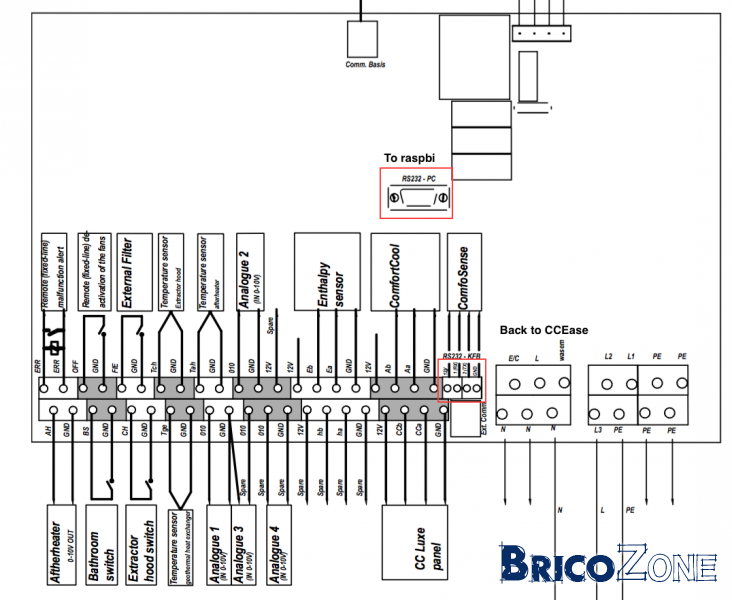
My current plan is to connect CCEase directly to its port in VMC, rasbpi to RS232-PC port and disable CCEase socat client in raspbi.
As per drawing:
5909656a7dcb17f4be.png

Is anybody able to confirm above VMC RS232-PC pinout?

No CCEase.
 
  • #1 070
Listhor, I'm logged in, I have installed telnet and lynx on your raspberry as I cannot access the port 80 (Web).

I have ran socat and frame are flowing through to the CCEASE.

client3.py comes back after about 15 seconds++

the cgi also seem to work from the command line, but when I try to access the Apache pages (web), I cannot find the VMC pages (using lynx, a command line browser), so what is you apache configuration ?

When I check the message queue, the number of messages in the queue increases as time goes by, which indicates that the system is slow. I see that you use motion and that is using most of the CPU resources (I have used it too), so I would be inclined to say that the system is a bit loaded and the frames cannot be serviced fast enough.

As a consequence they accumulate in the queue and when full, hell break loose.
 
  • #1 071
jcoenen;1081142 a dit:
Listhor, I'm logged in, I have installed telnet and lynx on your raspberry as I cannot access the port 80 (Web).

I have ran socat and frame are flowing through to the CCEASE.

client3.py comes back after about 15 seconds++

the cgi also seem to work from the command line, but when I try to access the Apache pages (web), I cannot find the VMC pages (using lynx, a command line browser), so what is you apache configuration ?

When I check the message queue, the number of messages in the queue increases as time goes by, which indicates that the system is slow. I see that you use motion and that is using most of the CPU resources (I have used it too), so I would be inclined to say that the system is a bit loaded and the frames cannot be serviced fast enough.

As a consequence they accumulate in the queue and when full, hell break loose.

Jcoenen,
Apache works on 8080 port as I need motioneye on port of 80; VMC pages are stored in /var/www/html as per Jessie and Apache2 configuration (copies are also in /var/www - not in use). To access pages use i.e. localhost:8080/VMC1.html. I've already tested system without motioneye running and even not having installed (on Wheezy). And it's exactly the same. Having both motioneye and server under full load, total CPU load is around 55%.
I think the key is to find why server.py drops its load once CCEase comms are on... I wasn't able to do that...

Just for test purposes, I've stopped motioneye service...
 
Dernière édition par un modérateur:
  • #1 072
Hello,

Alors voici ou j'en suis:
Ma conf:

root@jeedom:/etc/VMC# ls
VMC.ini VMC.ini.old
root@jeedom:/etc/VMC# vi VMC.ini

[VMC]
device = /dev/ttyUSB0

[server]
bind =
port = 10001

[control]
port = 10002

[client]
server = 127.0.0.1

[debug]
log = /var/log/VMClog.log
level = 8

Ensuite, ce qui tourne (je ne vois rien qui ressemble a raspivmc, peut etre fail2ban ...)

root@jeedom:~/raspVMC-master# ps -ef | grep server
www-data 475 1 0 14:25 ? 00:00:40 /usr/bin/nodejs /usr/share/nginx/www/jeedom/core/nodeJS/server.js
root 1235 1 0 14:26 ? 00:00:23 /usr/bin/python /usr/bin/fail2ban-server -b -s /var/run/fail2ban/fail2ban.sock -p /var/run/fail2ban/fail2ban.pid
www-data 1795 1 0 14:32 ? 00:04:27 /usr/bin/python /usr/share/nginx/www/jeedom/plugins/openzwave/core/class/../../ressources/zwaveserver/openZWave.py --pidfile=/tmp/openzwave.pid --device=/dev/ttymxc0 --log=Error --port=8083 --config_folder=/usr/share/nginx/www/jeedom/plugins/openzwave/core/class/../../ressources/openzwave/config --data_folder=/usr/share/nginx/www/jeedom/plugins/openzwave/core/class/../../data --callback=http://127.0.0.1:80/plugins/openzwave/core/php/jeeZwave.php --apikey=kpbtld36w4krm6g2gbaw --serverId=0
root 16613 16002 0 22:57 pts/0 00:00:00 grep server

Les ports en écoute: (je ne vois pas le port 10001:-/ )
root@jeedom:~/raspVMC-master# netstat
Active Internet connections (w/o servers)
Proto Recv-Q Send-Q Local Address Foreign Address State
tcp 0 0 localhost:51653 localhost:8070 ESTABLISHED
tcp 0 0 localhost:51571 localhost:8070 ESTABLISHED
tcp 0 0 192.168.1.11:http 192.168.1.1:55651 ESTABLISHED
tcp 0 0 localhost:45263 localhost:http TIME_WAIT
tcp 0 0 localhost:8070 localhost:51571 ESTABLISHED
tcp 0 0 localhost:51625 localhost:8070 ESTABLISHED
tcp 0 0 localhost:37657 localhost:8334 TIME_WAIT
tcp 0 0 localhost:37660 localhost:8334 TIME_WAIT
tcp 0 0 localhost:37662 localhost:8334 TIME_WAIT
tcp 0 0 192.168.1.11:http 192.168.1.1:55647 ESTABLISHED
tcp 0 0 localhost:45258 localhost:http TIME_WAIT
tcp 0 0 localhost:8070 localhost:51625 ESTABLISHED
tcp 0 0 localhost:37654 localhost:8334 TIME_WAIT
tcp 0 0 localhost:8070 localhost:51653 ESTABLISHED
tcp 0 0 localhost:45260 localhost:http TIME_WAIT
tcp 0 0 localhost:37659 localhost:8334 TIME_WAIT
tcp 0 0 localhost:37655 localhost:8334 TIME_WAIT
tcp 0 0 localhost:37651 localhost:8334 TIME_WAIT
tcp 0 0 localhost:37663 localhost:8334 TIME_WAIT
tcp 0 0 192.168.1.11:http 192.168.1.1:55391 ESTABLISHED
tcp 0 0 192.168.1.11:http 192.168.1.1:55390 ESTABLISHED
tcp 0 184 192.168.1.11:ssh 192.168.1.1:55734 ESTABLISHED
tcp 0 0 localhost:45252 localhost:http TIME_WAIT
tcp 0 0 192.168.1.11:http 80.12.43.16:64935 ESTABLISHED
Active UNIX domain sockets (w/o servers)
Proto RefCnt Flags Type State I-Node Path
unix 2 [ ] DGRAM 2422 /run/systemd/notify
unix 2 [ ] DGRAM 2439 /run/systemd/shutdownd
unix 9 [ ] DGRAM 2444 /run/systemd/journal/dev-log
unix 5 [ ] DGRAM 2454 /run/systemd/journal/socket
unix 2 [ ] DGRAM 2760 /run/systemd/journal/syslog
unix 3 [ ] STREAM CONNECTED 6258
unix 3 [ ] STREAM CONNECTED 235295
unix 3 [ ] STREAM CONNECTED 7842
unix 3 [ ] STREAM CONNECTED 7843
unix 2 [ ] DGRAM 6252
unix 3 [ ] STREAM CONNECTED 7154
unix 3 [ ] STREAM CONNECTED 7157
unix 3 [ ] STREAM CONNECTED 5460 /run/systemd/journal/stdout
unix 3 [ ] STREAM CONNECTED 7152
unix 2 [ ] DGRAM 10699
unix 3 [ ] STREAM CONNECTED 5414
unix 2 [ ] STREAM CONNECTED 11423
unix 3 [ ] STREAM CONNECTED 5548
unix 3 [ ] STREAM CONNECTED 6232
unix 2 [ ] DGRAM 6541
unix 3 [ ] STREAM CONNECTED 6873
unix 3 [ ] STREAM CONNECTED 6667
unix 3 [ ] STREAM CONNECTED 6816 /run/systemd/journal/stdout
unix 2 [ ] DGRAM 6318
unix 3 [ ] STREAM CONNECTED 6666
unix 3 [ ] STREAM CONNECTED 6874 /var/run/dbus/system_bus_socket
unix 3 [ ] STREAM CONNECTED 5549 /run/systemd/journal/stdout
unix 2 [ ] DGRAM 6864
unix 3 [ ] STREAM CONNECTED 6235
unix 2 [ ] STREAM CONNECTED 11093
unix 3 [ ] STREAM CONNECTED 5741
unix 3 [ ] STREAM CONNECTED 7158
unix 2 [ ] DGRAM 236681
unix 3 [ ] STREAM CONNECTED 234856 /var/run/mysqld/mysqld.sock
unix 3 [ ] STREAM CONNECTED 234855
unix 3 [ ] STREAM CONNECTED 6316 /var/run/dbus/system_bus_socket
unix 2 [ ] DGRAM 7800
unix 3 [ ] STREAM CONNECTED 235296 /var/run/mysqld/mysqld.sock
unix 3 [ ] STREAM CONNECTED 234529
unix 3 [ ] STREAM CONNECTED 7153
unix 3 [ ] STREAM CONNECTED 7155
unix 3 [ ] STREAM CONNECTED 5459
unix 3 [ ] STREAM CONNECTED 6313
unix 3 [ ] STREAM CONNECTED 5415 /run/systemd/journal/stdout
unix 3 [ ] STREAM CONNECTED 234530 /var/run/mysqld/mysqld.sock
unix 3 [ ] STREAM CONNECTED 6314
unix 3 [ ] STREAM CONNECTED 7156
unix 3 [ ] STREAM CONNECTED 5654 /run/systemd/journal/stdout
unix 3 [ ] DGRAM 3206
unix 3 [ ] DGRAM 3205
unix 3 [ ] STREAM CONNECTED 6233 /run/systemd/journal/stdout
unix 3 [ ] STREAM CONNECTED 6315 /var/run/dbus/system_bus_socket
unix 3 [ ] STREAM CONNECTED 5742 /run/systemd/journal/stdout
unix 3 [ ] STREAM CONNECTED 5653
unix 3 [ ] STREAM CONNECTED 6815
unix 2 [ ] DGRAM 3202
unix 3 [ ] STREAM CONNECTED 7159
unix 3 [ ] STREAM CONNECTED 5235 /run/systemd/journal/stdout
unix 2 [ ] DGRAM 2769
unix 2 [ ] DGRAM 5064
unix 3 [ ] STREAM CONNECTED 5234


Dans le doute je relance le serveur mais, le PID est bien présent ...:
root@jeedom:~/raspVMC-master# ./server.py &
[1] 16879
root@jeedom:~/raspVMC-master# Traceback (most recent call last):
File "./server.py", line 218, in <module>
CCserver.bind(CCserver_address)
File "/usr/lib/python2.7/socket.py", line 224, in meth
return getattr(self._sock,name)(*args)
socket.error: [Errno 98] Address already in use

[1]+ Exit 1 ./server.py
root@jeedom:~/raspVMC-master#
 
  • #1 074
listhor;1081174 a dit:
Jcoenen,
Apache works on 8080 port as I need motioneye on port of 80; VMC pages are stored in /var/www/html as per Jessie and Apache2 configuration (copies are also in /var/www - not in use). To access pages use i.e. localhost:8080/VMC1.html. I've already tested system without motioneye running and even not having installed (on Wheezy). And it's exactly the same. Having both motioneye and server under full load, total CPU load is around 55%.
I think the key is to find why server.py drops its load once CCEase comms are on... I wasn't able to do that...

Just for test purposes, I've stopped motioneye service...

OK, I have a autoreload on the pages as per one's request to have the changes be visible on the webpage, the auto reload is done every 5 seconds, as your setup cannot deliver faster then every 15/17 seconds, it cannot not work.

I commented it out in VMC3.html, setup a port forward and on safari it still does not work (god knows why) but on Firefox I get the page (mysteries of HTML implementation), with the CCEASE running, it takes about 17 seconds to get the whole picture, but I consistently get it back, so to me it is working albeit slowly.
 
Dernière édition par un modérateur:
  • #1 076
rjcab;1081262 a dit:

Je vais revoir l'allocation des ports avec une wheezy normale tout fonctionne mais dès qu'on se met a chipoter sur les port ça merdouille.
 
  • #1 077
jcoenen;1081278 a dit:
OK, I have a autoreload on the pages as per one's request to have the changes be visible on the webpage, the auto reload is done every 5 seconds, as your setup cannot deliver faster then every 15/17 seconds, it cannot not work.

I commented it out in VMC3.html, setup a port forward and on safari it still does not work (god knows why) but on Firefox I get the page (mysteries of HTML implementation), with the CCEASE running, it takes about 17 seconds to get the whole picture, but I consistently get it back, so to me it is working albeit slowly.

Thanks Jcoenen! So far, the only thing which got changed is VMC3.html or something else?
By "my setup" do you mean raspbpi or VMC? Like I said, raspbpi's load isn't that high, thus bottleneck must be VMC or its internal setting...
I think I will give it a try and test secondary RS232-PC port. I need to get only DB-9 plug and see how it goes.
I will remove remote access, unless you want to carry out further checks?

EDIT:
BTW, I tried to do autorun socat ccease command @ boot using cron in Jessie:

sudo crontab -e
OR just
crontab -e
@reboot /home/pi/socatccease
and content of socatccease file (done chmod +x)
#!/bin/bash
socat /dev/ttyUSB0,b9600,raw,echo=0 tcp:localhost:10001
exit 0

also having a command directly in cron:
@reboot /usr/bin/socat /dev/ttyUSB0,b9600,raw,echo=0 tcp:localhost:10001

And both methods don't work. What am I doinf wrong?
 
Dernière édition par un modérateur:
  • #1 078
listhor;1081310 a dit:
Thanks Jcoenen! So far, the only thing which got changed is VMC3.html or something else?
By "my setup" do you mean raspbpi or VMC? Like I said, raspbpi's load isn't that high, thus bottleneck must be VMC or its internal setting...
I think I will give it a try and test secondary RS232-PC port. I need to get only DB-9 plug and see how it goes.
I will remove remote access, unless you want to carry out further checks?

EDIT:
BTW, I tried to do autorun socat ccease command @ boot using cron in Jessie:


and content of socatccease file (done chmod +x)


also having a command directly in cron:


And both methods don't work. What am I doinf wrong?

I just removed the auto-reload in the javascript of VMC3.html, nothing else.

As far as the "load" is concerned, the CPU load can be the cause of the bottleneck, but other chanels could also participate to the problem, the device maxing out the throughput of a serial link can do so without overloading the CPU (especially if the speed of the link is low).

Your setup refers to the everything in the loop (raspberry pi, VMC, CCEASE ...), each user here has got his own "setup".

In jessie I'm not using cron to start socat I have used the systemd which replaces init, I think I have posted a service file on this forum on the subject.

You may remove the remote access for the time being, thanks.
 
  • #1 079
rjcab;1081263 a dit:
et rien dans les logs :

Bon et bien comme je n'ai pas d'explications logique a la chose, y aurait-il moyen de se connecter a ta machine histoire de regarder sous le capot ?

Comme d'habitude une réponse en MP ...
 
  • #1 080
jcoenen;1081338 a dit:
I just removed the auto-reload in the javascript of VMC3.html, nothing else.

As far as the "load" is concerned, the CPU load can be the cause of the bottleneck, but other chanels could also participate to the problem, the device maxing out the throughput of a serial link can do so without overloading the CPU (especially if the speed of the link is low).

Your setup refers to the everything in the loop (raspberry pi, VMC, CCEASE ...), each user here has got his own "setup".

In jessie I'm not using cron to start socat I have used the systemd which replaces init, I think I have posted a service file on this forum on the subject.

You may remove the remote access for the time being, thanks.

I'm not sure I understand phrase:
Your setup refers to the everything in the loop (raspberry pi, VMC, CCEASE ...), each user here has got his own "setup".
Did you mean that everything is served by one raspbpi? I would say, at the moment, everything is as per design (except Apache port):
VMC <-> raspbpi <-> CCEase
Maxing out serial port - too many frames received?

You posted how to create service for server.py:
For Jessie here it is

sudo nano /etc/systemd/system/VMCserver.service

[Unit]
Description=VMC python server
After=syslog.target network.target

[Service]
Type=simple
User=root
WorkingDirectory=/home/pi/raspVMC-master
ExecStart=/home/pi/raspVMC-master/server.py
StandardOutput=syslog
StandardError=syslog


Restart=always

[Install]
WantedBy=multi-user.target

Then

sudo systemctl start VMCserver

to activate it.

Can I apply similar thing for socat ccease command stored in bash file/script?
 

Sujet semblables

Réponses
10
Affichages
979
Nudji
Réponses
·
Affichages
145
Maka
Réponses
4
Affichages
385
Tchotto
Réponses
6
Affichages
1K
ironglove

Notre sélection

Retour
Haut